Paper Notes!
Created: 2024/12/16What is PaperNote?
PaperNote is the pilot project in a series of interactive experiences I plan to create for BreezyParks. These projects are designed to help me explore and learn technologies that intrigue me while also (hopefully) sparking some interest in people who may come across this site.
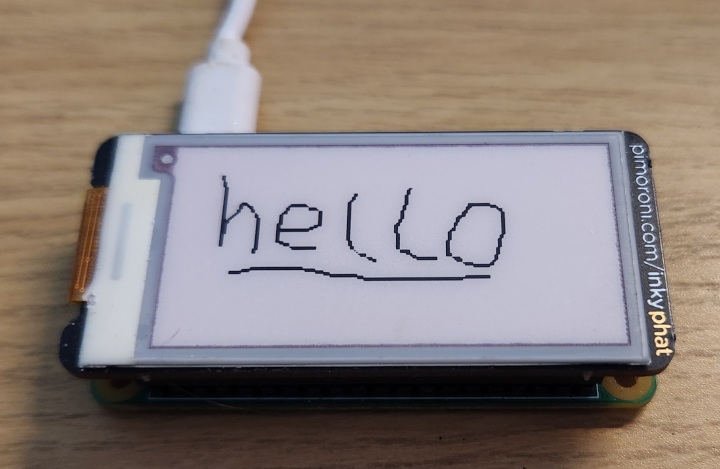
At the bottom of this page, you'll find a small canvas where you can draw. Once you've created something, you can click "Post" to send the image to my server, where it will be stored. On my end, a Raspberry Pi connected to a small e-paper display will retrieve a random image from the server once a day and showcase it on the display.
Why PaperNote?
Over the years, I've gathered a variety of fascinating tech gadgets, but many of them have ended up gathering dust after a bit of tinkering. The e-paper display, in particular, inspired me to repurpose it for something meaningful. Since it consumes no power to maintain a still image, it felt perfect for becoming a platform for communication and creativity. PaperNote transforms this technology into a collaborative project that I invite you to contribute to.
Technical Aspects
For each project I publish here, I plan to delve into the technical aspects to document the journey and share what I’ve learned along the way.
One of the key constraints of my current server and website configuration is storage and bandwidth. Image data, being relatively large compared to other types of data, posed a challenge, so I spent considerable time thinking about the best way to send, receive, and store it.
Initially, I considered encoding the image data in Base64 and sending it as a string in a JSON payload to the server. While this was a useful starting point, I quickly realized it wasn’t the most efficient solution. Reflecting on my experience in the C Piscine at 42 Bangkok—particularly the projects involving base conversions—I decided to abstract the problem further.
Since the image is black and white, each pixel could represent either a 1 or a 0. Grouping these pixels into chunks of four, I could encode them as a single hexadecimal character and send the resulting hex string in a JSON payload.
However, I soon discovered a flaw in this approach: a single hexadecimal character in a JSON payload uses between 8 and 32 bits, yet it only encodes 4 bits of data. This meant I was wasting between 4 and 28 bits for every four pixels of information.
The key insight I was missing was that I could send raw byte data over HTTP. In hindsight, I’m not sure how I overlooked this, but once I learned about the application/octet-stream content type, everything changed. This discovery allowed me to significantly improve the efficiency of both data transfer and storage. I could now pack 8 pixels into a single byte, send this raw byte data to the server, and store it as a BLOB in my database.
Closing Thoughts
Ultimately, I recognize that these efficiency improvements don’t provide a significant tangible benefit. The image size is only 212 × 104 pixels (22,048 pixels), and given the bandwidth and storage available in my setup, sending the image data as-is wouldn’t be an issue.
However, I saw this as an opportunity to challenge myself to be more mindful and disciplined about efficiency. It’s easy to rely on the power of modern computing to mask inefficient design, but I want to avoid falling into that trap. While I know I’ve written some poorly designed software in the past, I’m committed to improving and developing better habits as I continue to learn.
First.